

Will AI be a tool, or a crutch?
AI tools have become integral to the operation of the Gem State Chronicle, as they have for many other platforms, publications, and systems in our modern world. There is a great temptation, especially for young people, to allow AI to become a crutch, rather than a tool. Check out State Superintendent Debbie Critchfield’s new op-ed on how Idaho’s public schools are preparing students for the future of AI:
I’ve spoken to parents who want classrooms to be technology-free. I’ve spoken to local employers who demand a basic skillset in AI. And, I’ve spoken to teachers who are wondering how to walk the line between these two realities.
One thing is certain: AI is here to stay. Pretending it’s a fad is not the right answer for our students. Our kids need to know how to use technology but, most importantly, how to think for themselves. AI doesn’t replace thinking and can’t replicate judgment, emotional intelligence, and relational skills that make human teamwork irreplaceable.
Labrador defends the law
Attorney General Raúl Labrador announced today that a federal district court has rejected a long-standing constitutional challenge to Idaho’s Sexual Offender Registration and Notification Act (SORNA), dismissing all claims brought by individuals convicted of sex offenses and granting summary judgment in favor of the State of Idaho.
DEQ seeks comment
The Idaho Department of Environmental Quality (DEQ) is seeking public comment on a proposed settlement action and consent judgment with Payette Lakes Recreational Water and Sewer District (PLRWSD). DEQ alleges violations of the Clean Water Act and the Idaho Pollutant Discharge Elimination System (IPDES) permitting requirements.
Feature image created with ChatGPT, using a prompt that asked it to use its imagination.
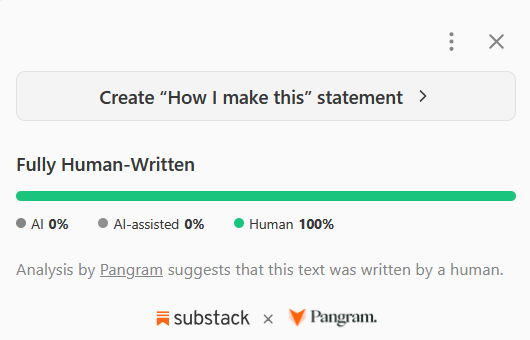
By the way, Substack has a fun new feature that uses Pangram to scan the text of the post to see how much of it was likely generated by a human, and how much by an AI tool. Use it on the next political newsletter you receive, and you might find the results enlightening.
For the record:
Have you been catching the Daily Minute? It’s an exclusive publication of the Gem State Chronicle summing up what you need to know, published most every weekday. You can subscribe on YouTube, Facebook, X, and even TikTok!
As always, thank you to sponsors Lynn Bradescu’s Boise Realty, Money Metals, and New Saint Andrews College. I just spent a few days visiting my friends at NSA, and they are doing amazing work up here in Moscow.
Thank you also to all the paid subscribers who make it possible for me to do what I do, as well as all the readers who are constantly encouraging me to keep it up. I appreciate you all!
The AI detection tool in Substack works only in Substack Reader, not browser based viewing. It's tricky to get to the Substack Reader from the browser. Here are some steps that worked for us.
How to view in Substack Reader from your browser:
1. Make sure you are logged into Substack with your email address (look for your icon on the right side of a post you're reading or go to https://substack.com/).
2. Click your icon if necessary.
3. Click Home on left side of screen.
4. Click Subscriptions on the right side of the screen (use See All if necessary)
5. Click the author you're interested in.
6. Find the article you're interested in (under Posts tab) and click it.
7. Now you're in the Substack Reader.
8. Click the three dots menu on right side of the screen.
9. Click Scan for AI text.
There are other ways to do this, but the above may be simplest. (NOTE: We did find an apparent bug in this feature, where we received AI detection unavailable messages and have reported it to Substack.)
Per the Substack help bot:
“AI detection unavailable” usually means the creator manually disabled AI detection for that specific post or note, or the content isn’t eligible, for example video/audio posts, standalone sites, custom domains, or emails. The tool works in Substack Reader for eligible posts and notes published on or after July 21, 2026, and Substack says neither Substack nor Pangram uses publisher content to train generative AI models.